Shine Bright: Creative Projects with the BEE 002 Template
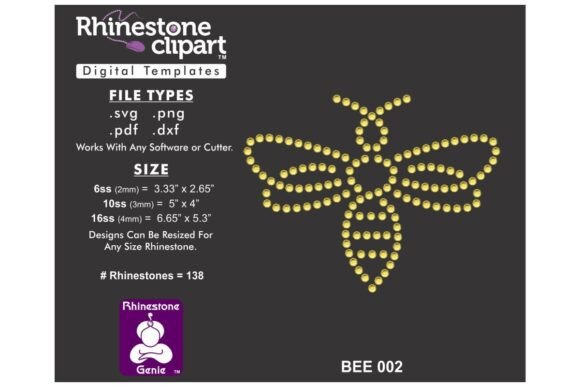
There is something undeniably magnetic about rhinestones. Whether it is the way they catch the light or the texture they add to an otherwise flat surface, bling has a way of turning heads. If you have ever wanted to take control of your own sparkling creations but felt limited by pre-made designs, it is time to look at digital assets that put the power back in your hands. Enter the Rhinestone Template Design BEE 002. This is not just another graphic; it is a digital toolkit designed for makers, crafters, and entrepreneurs who want to add a custom, high-quality shine to their products and apparel.
Unpacking the Digital Asset
Before we dive into the creative possibilities, it is important to understand exactly what you are getting. A common misconception with digital design files is that a physical product will arrive in the mail. To be clear, this is a digital downloadable file. You will not receive a physical template or a bag of rhinestones. Instead, you are purchasing the intellectual property and the vector data needed to create your own physical templates.
Once you complete your purchase, you will receive a Zip File. This is the industry standard for delivering large groups of files. Inside, you will find the design saved in four distinct formats: DXF, SVG, PNG, and PDF. Why so many? Because versatility is key in the design world. These files are suitable for most Graphic Design and CNC software, including popular cutting machines like Silhouette, Cricut, and Brother’s ScanNCut. If you are a professional designer using CorelDRAW or Adobe Illustrator, or utilizing SCAL Software, these files integrate seamlessly into your workflow.
The Versatility of Vector Formats
Understanding the file types is crucial for a smooth creative process. The SVG (Scalable Vector Graphics) format is often the go-to for web designers and those using newer cutting machines because it scales without losing quality. The DXF format is the "Drawing Exchange Format" and is particularly useful for older versions of Silhouette Studio and various CAD programs.
If you are using a standard cutting machine, the SVG or DXF will likely be your best friend. However, if you are simply looking to visualize the design or print a guide, the PDF and PNG formats are excellent. The advice here is practical: if you are unsure of what file type to use, try them all. Upload each one into your specific software application to determine which renders best on your screen and cuts most efficiently on your machine.
Scaling and Precision: Getting the Cut Right
One of the standout features of the BEE 002 design is its adaptability. The design is sized specifically for ss10 rhinestones, which have a diameter of approximately .13 inches (3.3mm). This is a very standard size for apparel decoration, offering a good balance between detail and visual impact.
However, not all projects are created equal. You might want to use larger stones for a bold statement piece or smaller stones for intricate detailing. Because this is a vector-based file, you can resize if desired. The most critical piece of advice here is to always resize proportionally. Stretching the design horizontally or vertically will distort the pattern, making it impossible for the rhinestones to fit properly.
Furthermore, remember that not all cutters are the same. Machine blades, pressure settings, and materials vary. You may need to adjust the size of the holes slightly so your machine cuts the template to the proper size for your specific stones. This is where the "DIY" aspect shines; you have total control over the calibration.
From Digital File to Physical Bling
The workflow for using the Rhinestone Template Design BEE 002 is straightforward, but it requires a bit of patience and practice. First, unzip the folder you downloaded. Next, import or upload the correct file type into your software. If you are using a Silhouette Cameo, you might prefer the DXF or SVG. If you are using a Cricut Maker, SVG is usually the standard.
Once the design is on your digital canvas, you will notice that the shapes represent the "holes" where the rhinestones will sit. You will cut this design out of a specialized material (like flock heat transfer vinyl or a plastic template sheet). Once cut, you brush your rhinestones into the holes, apply transfer tape, and then adhere them to your garment using a heat press.
Creative Applications: Beyond Just T-Shirts
While apparel decoration is the primary use for this file, thinking outside the box can set your brand apart. Here are a few ways you can utilize the BEE 002 design for commercial and personal projects:
- Custom Merchandise: Apply the design to tote bags, denim jackets, or baseball caps. A sparkling bee motif is perfect for boutique fashion brands or cheerleading squads.
- Event Decor: Create centerpieces or signage for a garden party or a wedding. The template can be used to create stencils for wood signs that are then painted and glittered.
- Home Decor: Add some sparkle to throw pillows or canvas art. A rhinestone design adds a tactile, 3D element that standard printing cannot match.
- Marketing Assets: If you are a small business owner, use the design to create limited edition merchandise. A "bling" version of your logo or mascot can be a high-ticket item.
- Digital Products: Use the PNG file as an overlay in social media graphics to announce a "VIP" sale or a "Sparkling New Arrival."
Letter Sets and Customization
It is vital to note that if the design includes letter sets, they are not typable fonts. You cannot simply select them in your text tool and type "Happy Birthday." Instead, you must pick and place individual letters to create your design. This is standard for rhinestone templates because the spacing (kerning) between letters often needs to be adjusted manually to ensure the stones don't overlap or look too sparse.
This manual placement allows for true customization. You can curve the text, stack it, or integrate it directly into the graphic elements of the BEE 002 design. It gives you the flexibility of a graphic designer, even if you are using a simple cutting machine software.
Final Thoughts on the DIY Approach
The Rhinestone Template Design BEE 002 is more than just a file; it is a gateway to professional-grade customization. By providing multiple file formats (DXF, SVG, PNG, PDF), it ensures compatibility with the vast majority of design software and cutting machines on the market today. Whether you are a hobbyist making a gift for a friend or a business owner expanding your product line, this digital asset provides the foundation for high-quality, sparkling creations. Just remember to unzip, resize proportionally, and calibrate your machine for the perfect cut.